
; a lighter desktop workspace for 3D printing
A fast native front‑end for the slicers you already trust.
Arrange plates, edit profiles, inspect G-code layer by layer and send the job to your printer. OrcaSlicer or Bambu Studio does the slicing. Same engine, same G-code — a much lighter app.
- Linux · Windows · macOS (experimental)
- 21–32 MB download
- free, AGPL-3.0
- needs OrcaSlicer or Bambu Studio
version 0.1.6 · released
Slicenv is independent and not affiliated with Bambu Lab or the OrcaSlicer team.
- from launch to the main window (0.21–0.22 s)
- 0.2s
- of memory at idle (82–88 MB)
- 85MB
- to open a 1M-triangle 3MF with four plates
- 0.8s

* filled at the slow end; 0.8 s was also measured
Replay of recorded measurements: time from launch to the main window. Measured 2026-11-08, before 0.1.6, on Ryzen 7 7840HS · CachyOS · GNOME 51. Bands are the measured ranges.
| App | Main window after launch | In the replay |
|---|---|---|
| Slicenv | 0.21–0.22 s | 0.22 s |
| Bambu Studio 2.7–2.8 | 1.4–1.6 s | 1.60 s |
| OrcaSlicer 2.4–2.5 | 0.8–4.0 s | 4.00 s * |
; LAYER 1 — inspect one real print
One knot. One real job. Every line of it.
This is what Slicenv’s Preview shows: the toolpaths your engine produced, layer by layer, or the same plate as a finished print. Drag the edge between the two.

; LAYER 2 — your engine, your G-code
Slicenv doesn’t slice. On purpose.
The engine is the part of a slicer you trust with your prints, so Slicenv keeps it. It runs the official OrcaSlicer or Bambu Studio as a separate process and replaces only the heavy shell around it.
- model.3mf STL, 3MF, OBJ
- Slicenv plates, profiles, preview
- OrcaSlicer 2.5.0 slices, as a separate process
- plate.gcode the engine’s own output
- printer LAN or Bambu Connect
Slicing engine
$ ~/.local/share/slicenv/engines/orca/2.5.0/AppRun --slice 0 --outputdir out project.3mf
With the same engine, version and settings you get the G-code that engine would give you anyway.
When an engine crashes on a project
- IF
- the engine crashes
- THEN
- retry in compatibility mode, stage by stage
- ELSE IF
- it still fails
- THEN
- offer another engine, with your settings carried over
Several versions side by side
The manager finds installed engines, downloads official builds, verifies their SHA-256 and switches between them.
Every profile your engine has
Printer, process and filament profiles come from the engine. The editor adds illustrated help for each setting.
Nothing bundled
Engines are not shipped inside Slicenv. If none is installed, the first-run wizard downloads an official build.
; LAYER 3 — the app
Four screens from model to printer.
Real screenshots of 0.1.6 with a demo printer, not mock-ups. Switch the skin and the theme: it is the same window.
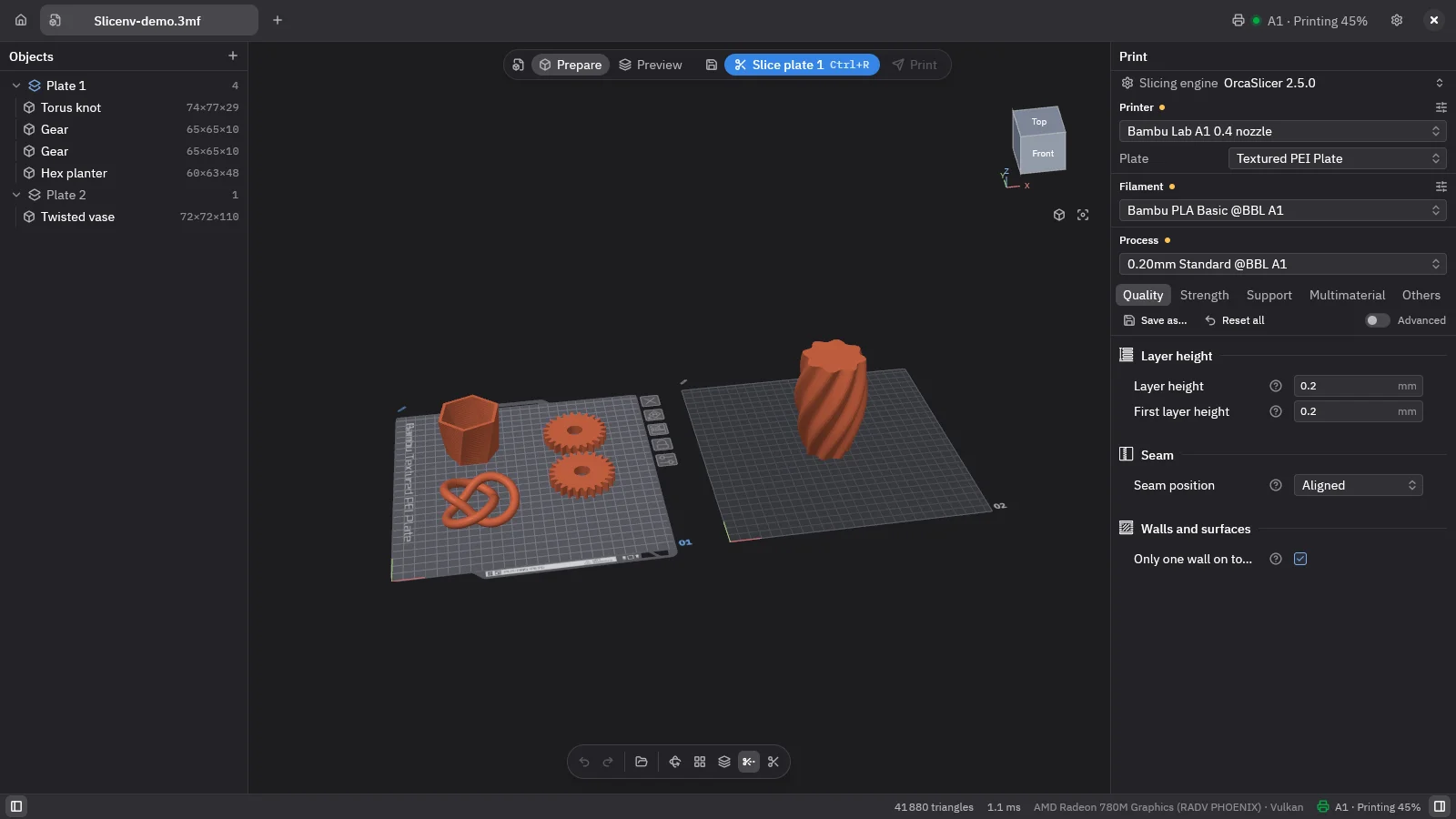
Arrange the plates
Plates, objects, parts and modifiers. Move, rotate, scale, auto-orient, arrange, measure, cut — with undo and redo.
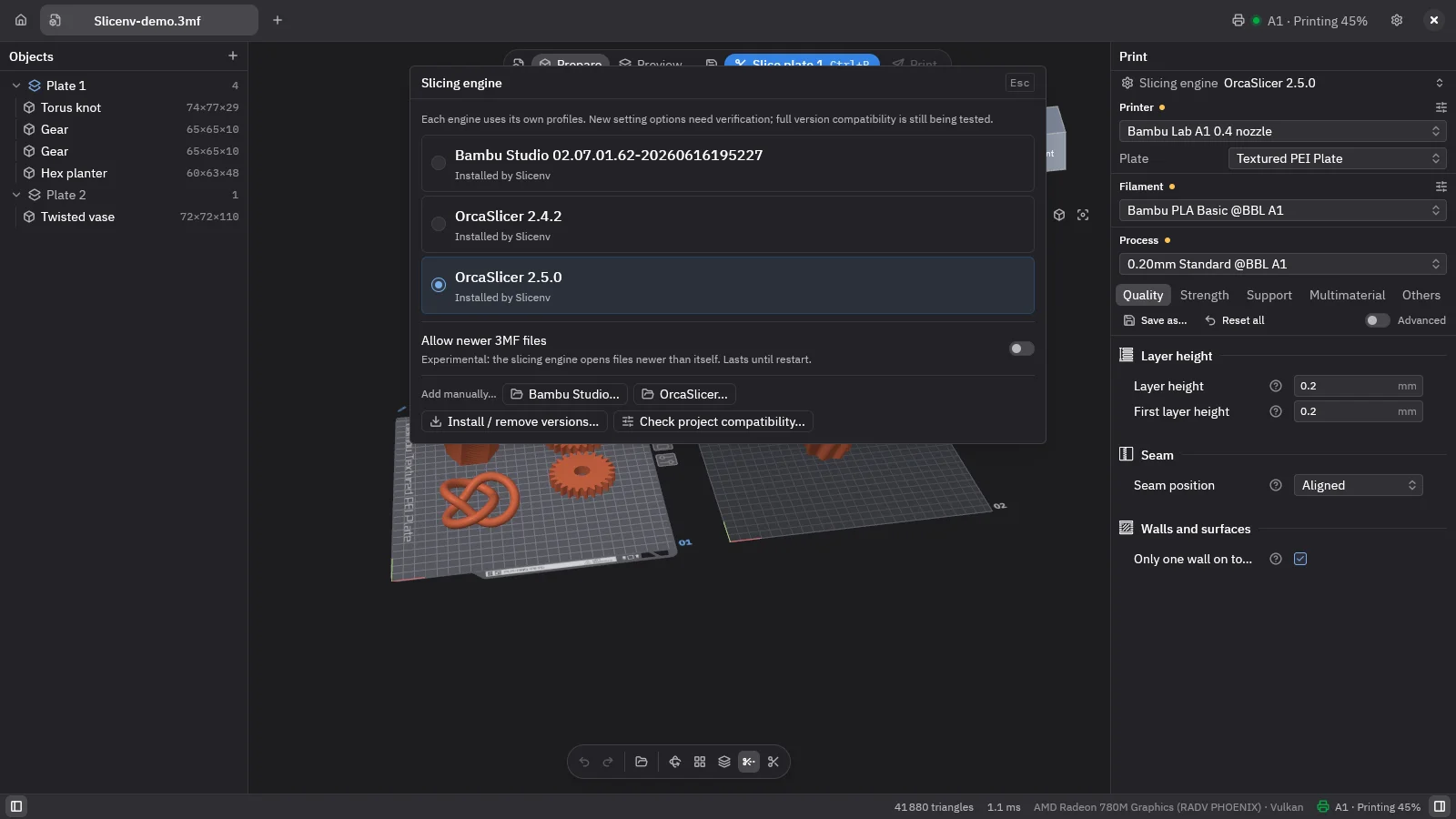
Hand the plate to the engine
Slicenv calls the engine’s command line and reads its progress. Pick the engine and its version per project.
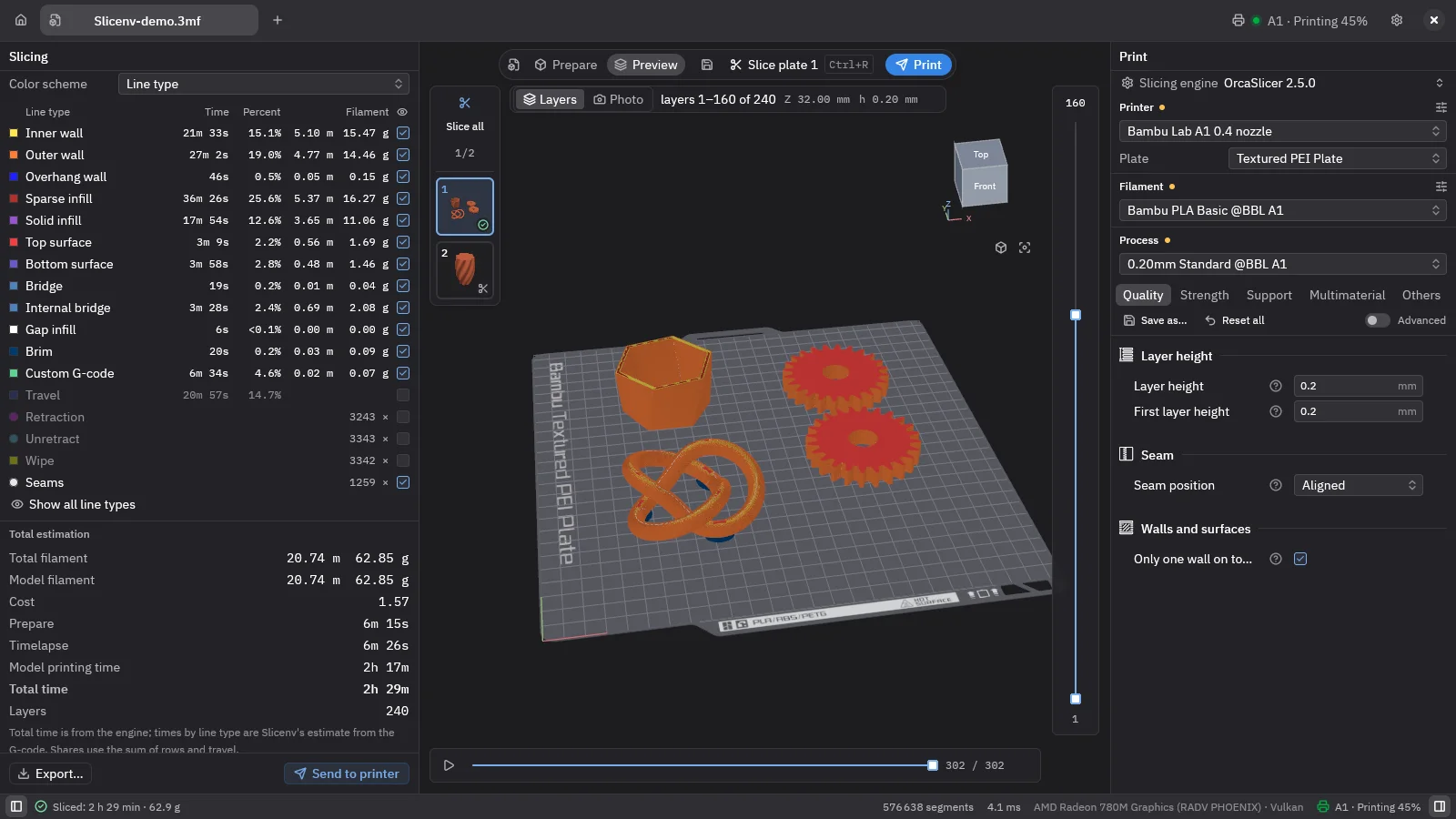
Read the G-code
Layers and line types, sliders for layer and move, time and filament per line type. Or Photo mode: the plate as a finished print.
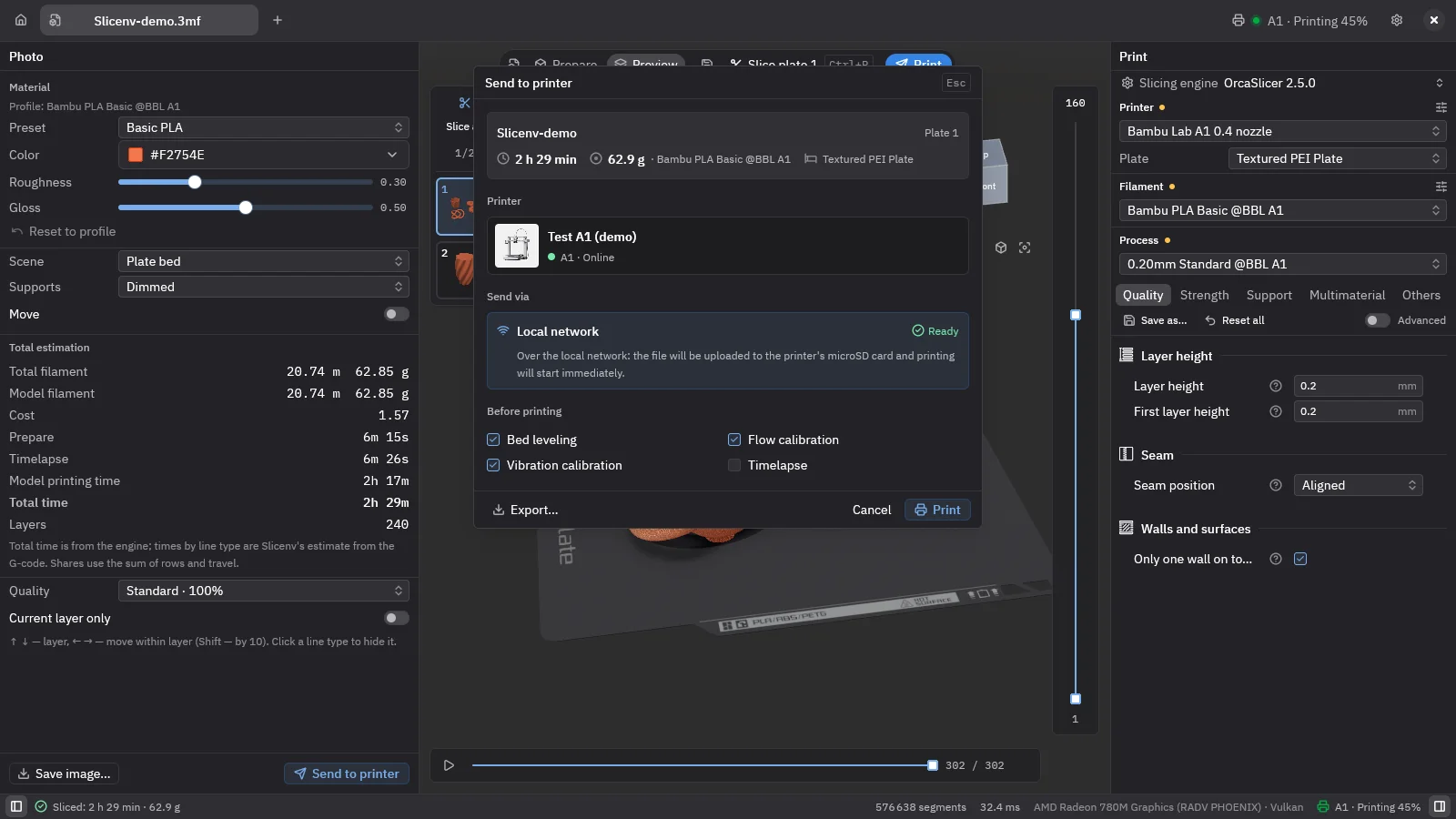
Send it
Pick the printer as a card, get a warning if the model does not match, set the options that printer supports.
The switches change the screenshot only. This page stays dark.
; LAYER 4 — printers, honestly
On the local network — directly. Over the internet — hand-off to Bambu Connect.
Printer support is where vendor rules matter most, so here is exactly what works.
LAN
Local network: directly
Written in pure Rust. No plugin and no account for printing on your own network.
- discovery
- status
- camera
WAN
Internet: hand-off to Bambu Connect
Slicenv passes the sliced file to Bambu Connect, which sends it to the printer. Bambu Connect exists for Windows and macOS; there is no Linux version, so on Linux you print over the local network.
- file hand-off
- Windows and macOS only
CLOUD
Cloud monitoring: optional
Status, history and camera over the cloud need Bambu’s closed plugin. It is downloaded only with your consent. Linux x86_64 and Windows x64.
- status
- history
- camera
Works with Bambu Lab A1, P1, X1 and P2S printers.
- Klipper via Moonraker: the code exists, tested only on an emulator so far.
- AMS slot mapping in the print dialog is not supported yet.
; LAYER 5 — for agents
An agent can drive it. You can undo the agent.
Slicenv ships an MCP server. An AI agent opens the project, moves objects, slices and reads the stats — and every one of its edits lands in the same undo history as yours.
- ; connected · edits allowed · waiting for a prompt
- >The four knots are piled up in the middle. Lay them flat, arrange them and slice the plate.
- →project_summary {}
- ←plates 1 · objects 4 × "torus-knot" · position [128.0, 128.0] ×4 · size_mm [80.6, 29.0, 80.4] · can_undo "Paste 3 copies"
- →orient_plate {"plate": 1}✎
- ←objects 4 · rotation_deg [90.0, 0.0, 0.0] · size_mm [80.6, 80.4, 29.0]
- →arrange_plate {"plate": 1, "spacing_mm": 6}✎
- ←objects 4 · position [84.7, 84.8] [171.3, 84.8] [84.7, 171.2] [171.3, 171.2]
- →slice_plate {"plate": 1}
- ←engine "OrcaSlicer" · print_time_s 13690 · filament_g 71.84 · layers 145 · layer_height_mm 0.2 · warnings []
- agent:Done: the four knots lie flat in a 2 × 2 grid, 6 mm apart. 3 h 48 min, 71.8 g, 145 layers. The project is not saved.
A scripted illustration of real MCP tools, not a live connection. MCP documentation ↗
3 h 48 min 71.8 g 145 layers
undo one undo history, shared by the human and the agent
- agent Arrange plate (MCP)
- agent Auto-orient plate (MCP)
- you Paste 3 copies
; LAYER 6 — the numbers, including the bad ones
Where it wins. Where it loses.
Every number was measured in one run on one machine; where a value varied, the range is shown. Rows where Slicenv is worse get the same weight as the rest.
| Metric | Slicenv | Bambu Studio 2.7–2.8 | OrcaSlicer 2.4–2.5 | Slicenv is |
|---|---|---|---|---|
| Main window after launch | 0.21–0.22 s | 1.4–1.6 s | 0.8–4.0 s | faster |
| Memory at idle (PSS) | 82–88 MB | 919–970 MB | 762–887 MB | lighter |
| Open a 3MF: 1M triangles, 4 plates | 0.8 s · 278 MB | 10.2 s · 1335 MB | not measured | faster |
| CPU at idle | 0.2–0.3 % | 1.1–1.2 % | 0.4–1.3 % | lighter |
| Slice a small plate until layers show | 0.86 s | 0.45 s | not measured | slower |
| Slice a heavy plate | 3.38 s | 0.84 s | not measured | slower |
| Camera orbit: one core / GPU | 12–13 % / 18–21 % | 11–16 % / 5–9 % | not measured | costlier on GPU |
Measured 2026-11-08, before 0.1.6, on a Ryzen 7 7840HS with Radeon 780M, 64 GB, CachyOS, GNOME 51. Reproduce with tools/bench/compare.sh in the repository.
Why slicing is slower
The engine runs as a separate process: Slicenv writes the project out, starts the engine’s command line and reads the G-code back. Inside Bambu Studio the same engine is already loaded in memory. The 3D view is drawn off-screen and copied into the window, which makes orbiting cost more GPU.
What it doesn’t do
-
It doesn’t slice
There is no slicer of its own. You need OrcaSlicer or Bambu Studio; that adds about 377–530 MB on disk if you don’t have one.
-
It doesn’t print through Bambu Cloud
Over the internet — hand-off to Bambu Connect; on the local network — directly. Bambu Connect has no Linux version, so on Linux printing is local-network only.
-
No AMS slot mapping yet
The print dialog does not let you remap AMS slots.
-
Unsigned Windows and macOS builds
Windows SmartScreen warns on first run. macOS builds are experimental.
-
Klipper is unproven
Moonraker support has only met an emulator, not a real printer.
; LAYER 7 — get it
Download Slicenv 0.1.6
Free and open source. Linux is the primary platform.
Linux
x86_64 · Wayland and X11
- Arch (AUR)
yay -S slicenv-bin - Nix
nix run github:arximus88/slicenv
One more thing to install
Slicenv needs OrcaSlicer or Bambu Studio to slice. If you already have one, it is found automatically. If not, the first-run wizard downloads an official build: about 377 MB for OrcaSlicer or 530 MB for Bambu Studio.
AGPL-3.0-or-later All releases and notes SHA-256 sums